

25 Feb The AI Diary: Create Software Without Writing Code
Feb 25, 2026
After my last publication about OpenClaw, I received positive feedback from some readers—they appreciated that the article was practical. So, I decided to write another hands-on guide.
Today, we will build a web application that you can access from your browser. Its purpose will be to perform technical analysis of a stock market asset. I want to demonstrate how thin the line between “I have an idea” and “I have a Proof of Concept” has become. The cost, effort, and time required — even for someone without coding skills — have decreased drastically.
Let’s get started!
Cursor
First things first. Before we build our application, we need to install a piece of software on your machine called Cursor. This is where you will write your prompts to an LLM (AI agent), and where the AI agent will generate the code for you.
Use the following link to download and install Cursor on your computer: cursor.com/download
Once installed, open the application. The first time you launch it, you will be asked to create a Cursor account. Follow the required steps. You can choose between a free and a paid version. Keep in mind that the paid version gives you access to more powerful AI models and enables more complex tasks. However, if you are just testing, the free version is sufficient for now.
After logging in, we need to make one small configuration change. Go to View → Appearance and click “Move Primary Side Bar Left.”
You should now see a screen like this:
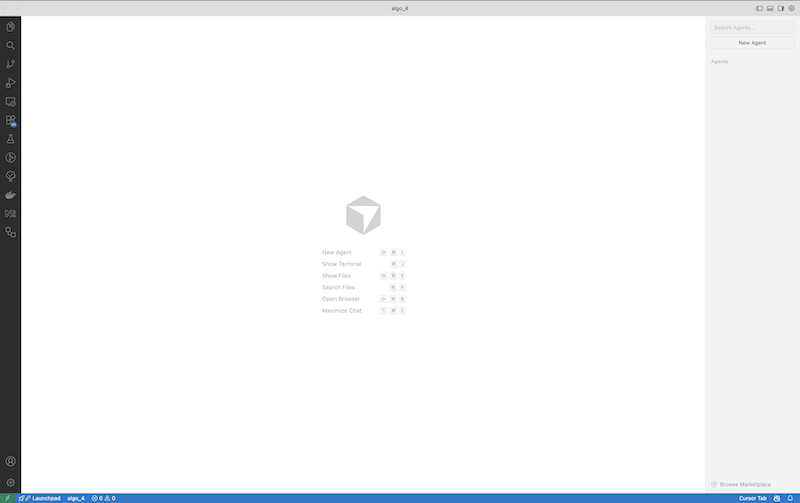
On the right side, click “New Agent”. This will open a window where you can interact with the AI agent and prompt it to build the software for you.
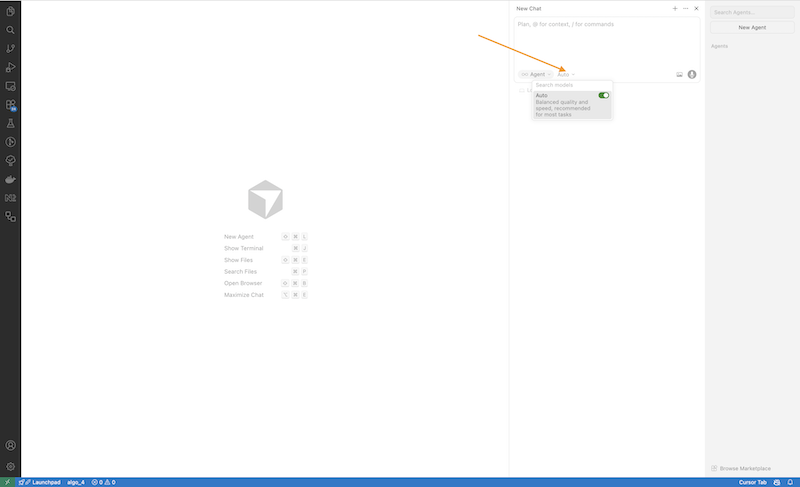
Look at the arrow on the screen. Right next to the “Agent” dropdown, there is another dropdown menu. Click on it and make sure you activate Auto mode. This will instruct Cursor to automatically select the most appropriate AI model for you.
However, if you are using the paid version of Cursor, I recommend turning this option off and manually selecting Opus 4.6 from the list of available models. As of writing this article, it is a powerful enough model to build your application effectively.
Keep in mind that if you truly want to build a robust, well-functioning application, using a powerful model is essential — and upgrading to the paid version of Cursor is highly recommended.
Prompt
Well, we’re ready to build.
Download the following file, which contains the complete prompt we will use to instruct the AI model inside Cursor to build the software for us:
Download link:
www.paveltashev.com/wp-content/uploads/2026/02/FULL_PROMPT.md.
Now, inside Cursor, choose File → Open… and open the file you just downloaded. This will load the prompt file into Cursor. The screen should look like this:
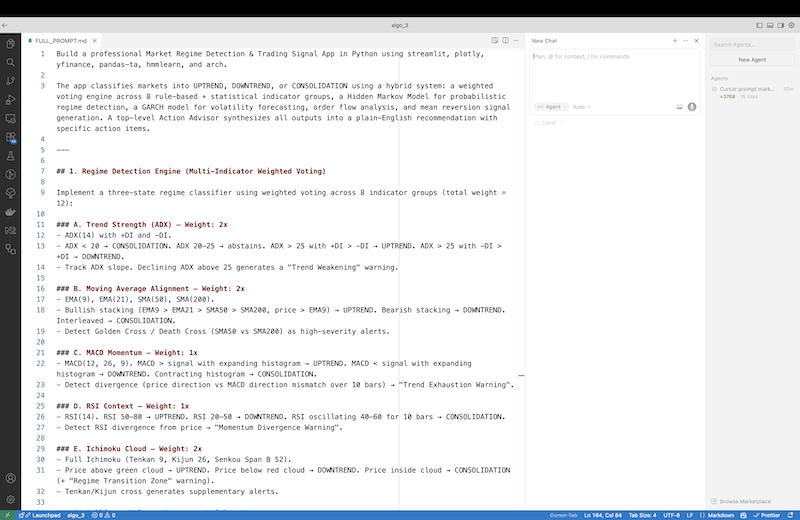
Let me explain again what we have here so that we’re sure we’re on the same page. On the left side, we have a file containing the prompt, which instructs the AI model on the right what to build.
You can read through the entire file and make changes if you want. For example, if you want to add an additional technical indicator for analyzing stock assets in your software, feel free to include it in the prompt.
As you’ll notice, prompt engineering is a skill that requires a strong command of a human language — English, for example — in order to clearly explain to the AI what you want to achieve. In fact, humans with a rich vocabulary and strong verbal expression skills tend to be good prompt engineers.
Another interesting aspect of prompt writing is that it requires well-structured thinking and the ability to describe in detail what you want to achieve. The AI model cannot read minds. If you don’t specify it, the model won’t know what you want.
The next step is to write the following prompt in the field on the right side:
Use the prompt in the currently open file (FULL_PROMPT.md) to build the application.
Hit Enter and wait. The AI model will start building the product for you. Once it’s finished, it should display something like this:
Yes — the app is already running. Open your browser and go to: http://localhost:8501
Keep in mind that the URL http://localhost:8503 may be different on your machine. Whatever URL it provides, simply open your web browser (e.g., Chrome), paste the URL, and hit Enter.
You should see something like this:
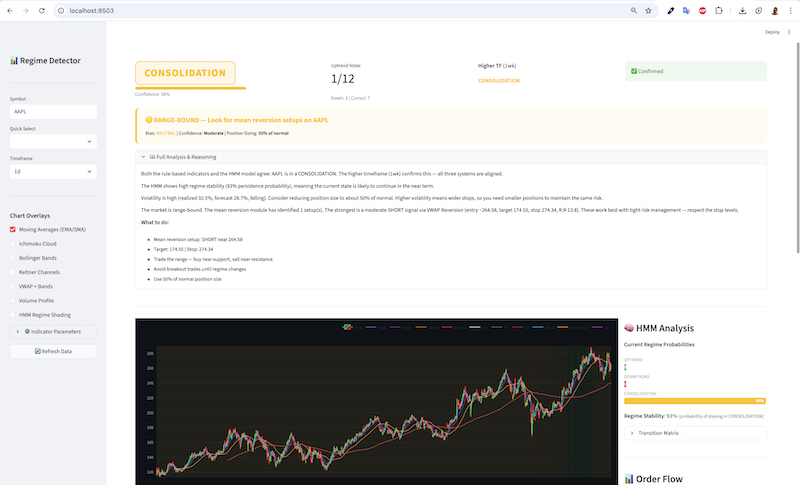
This piece of software does the following:
- On the left side, type the ticker of the stock asset and hit Enter.
- The app will extract data from Yahoo Finance, perform an analysis, and display an evaluation of the asset based on technical indicators, along with a suggestion of its current condition.
I want to strongly emphasize that this is not a tool you should use as a financial advisor! We built it solely to demonstrate how, from a simple specification (the prompt file), we can create a proof of concept (PoC) within minutes — something that used to require weeks of work. I believe this will be particularly interesting for entrepreneurs without coding skills.
Issues You May Face
Confirmation
During its work, the AI agent may need your permission to perform certain actions. For example, it might need to access the web to search for something, or it may ask for your confirmation before building a solution. These types of requests from the AI agent are usually displayed as blue or brown buttons within the chat.
AI Models
Keep in mind that if the model you work with is not powerful enough, you may end up with an application that has many issues — issues you will eventually have to try to fix on your own. You may even need to switch to the paid version and choose a more powerful model.
Errors
After you open the application in your web browser, you may encounter errors. If you don’t know how to fix them, simply copy and paste the error messages to the agent and ask it to resolve them.
Context
AI models have a limited amount of information they can work with. For example, if you provide too much information or use it for an extended period, the results it produces may degrade. A good way to check if the context is too large is by looking at the very bottom of the chat with the AI agent.
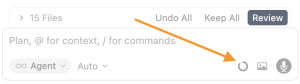
If the circle is almost full, that means the context is at its limit. The solution is to start a new chat session with the agent by clicking “New Agent” again, as I showed you earlier.
Ask For Help
If you are not a software developer and don’t have knowledge of the code behind the application, you can always ask the AI agent to guide you and help you decide what to do next. For example, if you ask the AI agent to build software for you, it may prompt you to choose certain technologies. Even if you are not familiar with them, you can simply explain that, and ask the AI agent to switch to a planning mode and guide you through the process.
What’s Next?
Well, experiment! Inside the prompt file, add your own description of what you want to build. You may have a different idea for another application—try building it.
Keep in mind that things may not work perfectly right away; there is a learning curve.
Experiment!
Will Software Engineers Become Jobless?
Everyone with a tool like Cursor — or any similar tool (there are many options out there) — will be able to build software much faster, even without prior coding knowledge. The number of software products and experiments we will witness will increase drastically, because going from an idea to a proof of concept (PoC) will require minimal effort.
On the other hand, software engineers who have deep knowledge of how the underlying technology works will have the greatest advantage. They will be able to quickly identify potential issues, guide the AI agent more efficiently, and deliver production-ready solutions much faster.
There is tons of work to be done. Many businesses will require AI integration and automation, and with tools like Cursor, developers will not only remain in demand — they will have plenty of work in the coming months and years. Meanwhile, everyone else, such as entrepreneurs, will be able to enter the world of software development much more easily.